Frequency → radial bars
Different parts of the spectrum drive different segments around the circle. The motion can be uneven because each segment follows its own frequency region.
Place cover artwork inside a circular frequency spectrum. The bars change length as the audio plays.
Play the demo, then change the settings. Your choices carry into the studio.
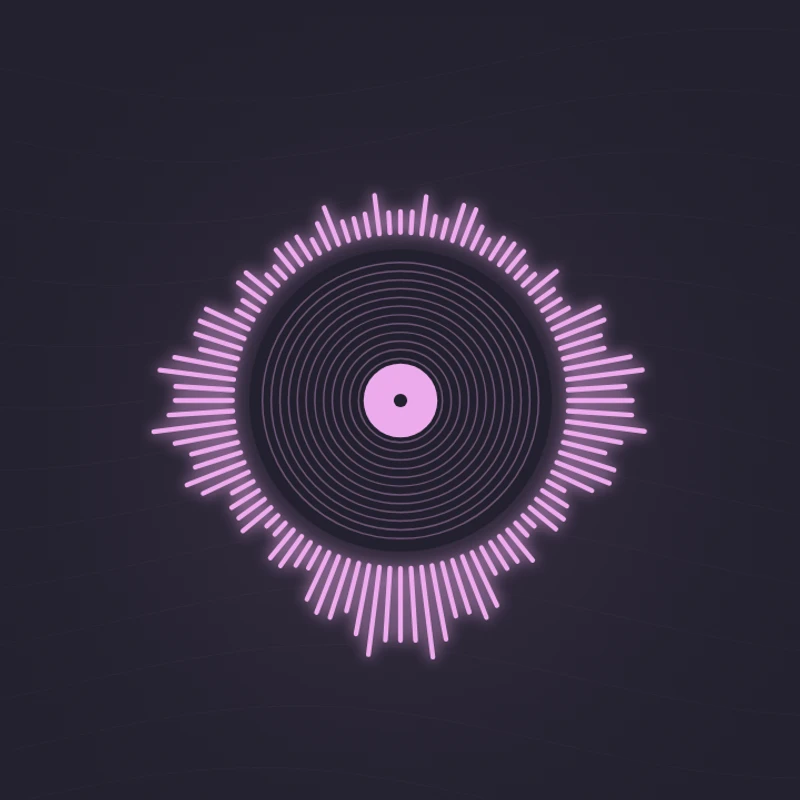
Use this templateCircular Spectrum wraps 100 short frequency bars around a central disc. The ring expands locally as different parts of your audio become stronger. Add cover artwork in the studio to replace the record graphic in the center; the audio-reactive ring remains visible around its edge.
Different parts of the spectrum drive different segments around the circle. The motion can be uneven because each segment follows its own frequency region.
Your cover is cropped into the circular center. It stays still so the artwork remains readable while the spectrum moves.
Make album or single artwork the focal point of a short music clip.
The centered composition has a natural fit in a square frame.
Keep artist identity visible while the ring responds to the track.
Choose “Use this template” above to open the studio with your preview settings. Add your own audio in the Audio panel, then choose the start and end of your clip.
A square frame gives the circular spectrum equal space on all sides. Keep important artwork away from the corners because the center uses a circular crop. Add artwork and a background in Design, then enter a title in Text.
Check the color contrast and movement during a strong passage. Export a 720p or 1080p video with your audio, or save a still PNG. Available video formats depend on your browser.
A centered subject or symbol works well. Small text near the edges of a square cover may disappear inside the circular crop.
Try your loudest passage before exporting. Reduce sensitivity if the radial bars crowd the edge of the frame.
Preview, customization, and export details.
Yes. The template uses a record-like center until you add your own image.
No. The center remains still. The surrounding frequency bars provide the animation, which keeps titles and logos on the artwork legible.
Yes. This template, the editing controls, and supported exports are free, with no watermark. You need the rights to any audio or artwork you add to your project.
Open a template to play its demo and change its settings.