Frequency → illuminated rows
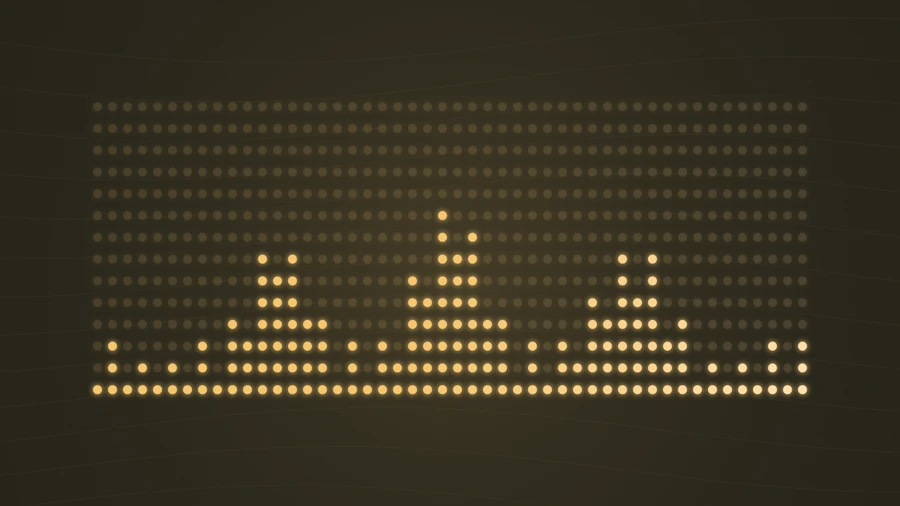
Each column follows a frequency region. Stronger energy lights more dots from the bottom upward.
Display frequency levels as columns of illuminated dots. The height of each column changes with the audio.
Play the demo, then change the settings. Your choices carry into the studio.
Use this templateDot Matrix translates the audio spectrum into 48 columns of lights. Each column has fourteen possible steps, with a dim grid remaining behind the active dots. The result has a retro display character while keeping the frequency changes easy to follow.
Each column follows a frequency region. Stronger energy lights more dots from the bottom upward.
Discrete rows give the movement a stepped quality. The dim, unlit dots make the underlying structure visible.
The display-like look suits instrumental beats and short producer previews.
A warm amber or green palette reinforces the equalizer aesthetic.
The simple dot shapes remain recognizable when the video is viewed at a smaller size.
Choose “Use this template” above to open the studio with your preview settings. Add your own audio in the Audio panel, then choose the start and end of your clip.
Landscape gives each column space. Start slightly above 1.0×, then lower sensitivity if most of the grid stays lit. Add artwork and a background in Design, then enter a title in Text.
Check the color contrast and movement during a strong passage. Export a 720p or 1080p video with your audio, or save a still PNG. Available video formats depend on your browser.
Use a sufficiently dark background so viewers can distinguish the active dots from the dim ones.
Preview the loudest section and reduce sensitivity if every column fills. Variation between columns gives the effect its character.
Preview, customization, and export details.
Both use frequency energy. Classic Bars changes the height of continuous bars; Dot Matrix lights a stepped grid of circular dots.
The grid dimensions are fixed in this template. You can change its color, sensitivity, glow, background, and output aspect ratio.
Yes. This template, the editing controls, and supported exports are free, with no watermark. You need the rights to any audio or artwork you add to your project.
Open a template to play its demo and change its settings.